osu!mania 4K overlay

Know your Dan level
in real time.

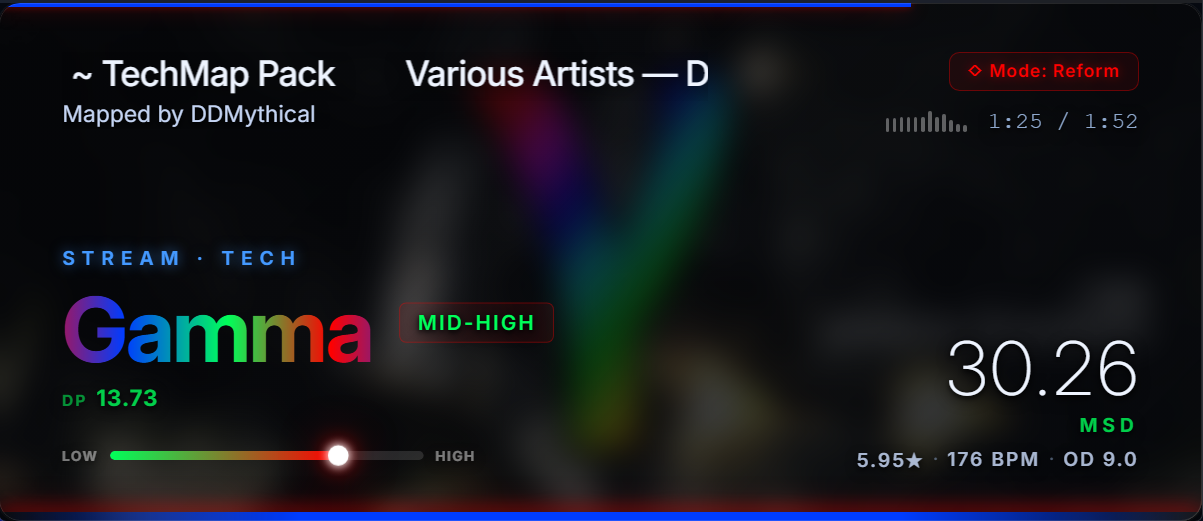
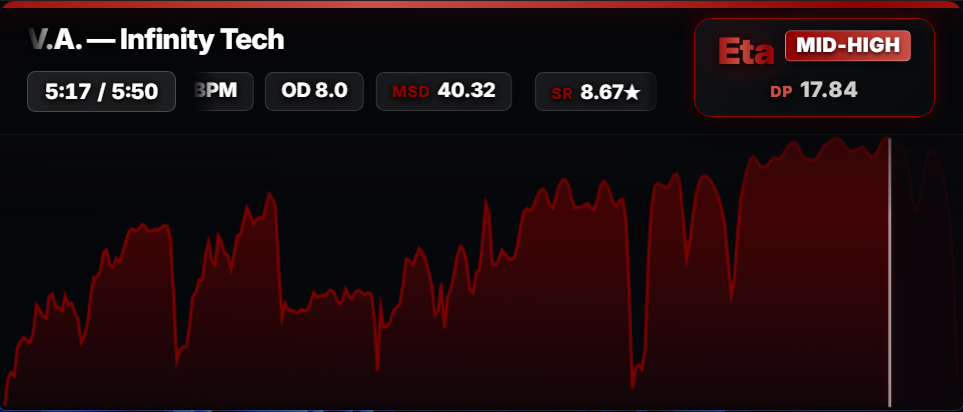
Connects to tosu, reads your current map, and estimates its Dan tier live across five scoring modes: Reform, Celestial, Signicial, Shoegazer, and an automatic LN Course mode for maps with more than 45% long notes.

Download for Windows v1.5 · Free · ~99 MB
DanOverlay showing Epsilon tier
Alphaα
Betaβ
Gammaγ
Deltaδ
Epsilonε
Zetaζ
Etaη
Thetaθ
Iotaι
Kappaκ

Ten Reform tiers · α through κ · logos by icyilc
Three things it does.

No bells, no whistles. Just the data you actually want while playing.

01

Live Dan Estimation

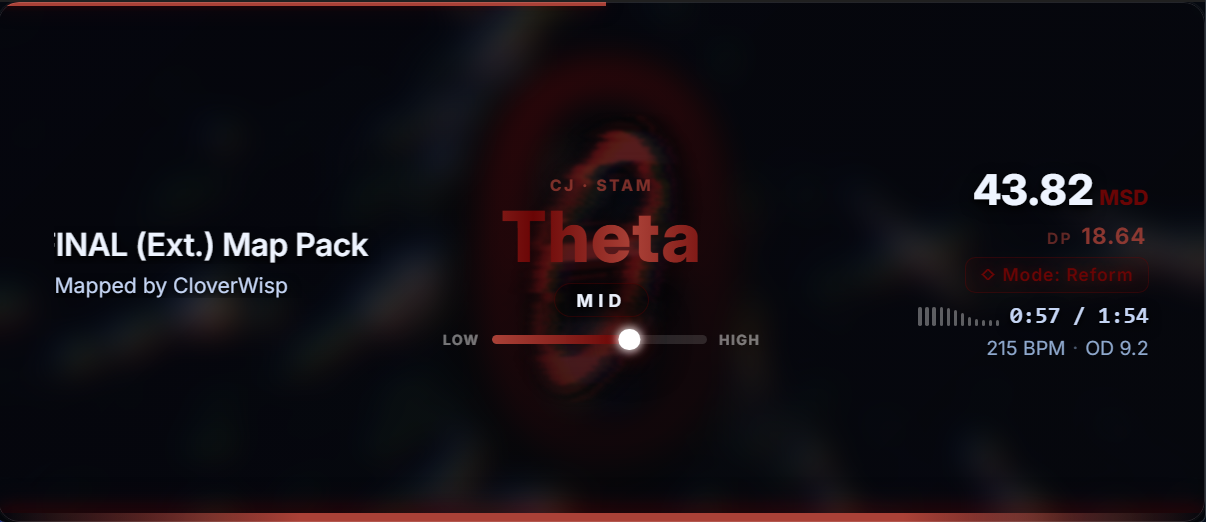
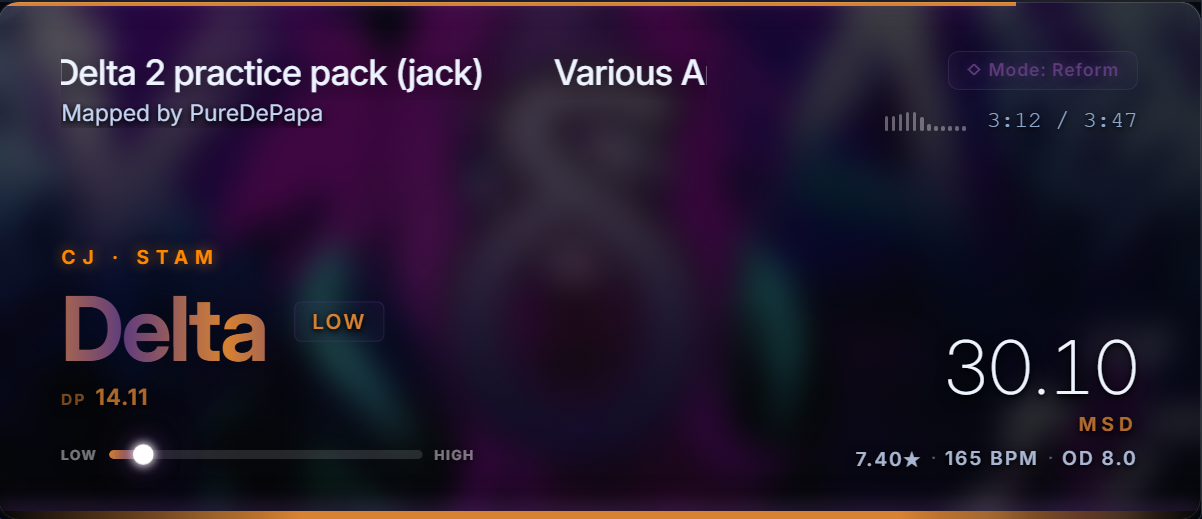
Reads map SR, runs it through per-skillset calibration for each tier, and shows you where it lands. Updates automatically when you switch maps.

02

Skillset Classification

Powered by MinaCalc. Classifies your map as Jack, Stream, Tech or Stamina and surfaces sub-patterns like CJ · JS or STAM · HS.

03

Export Density Charts

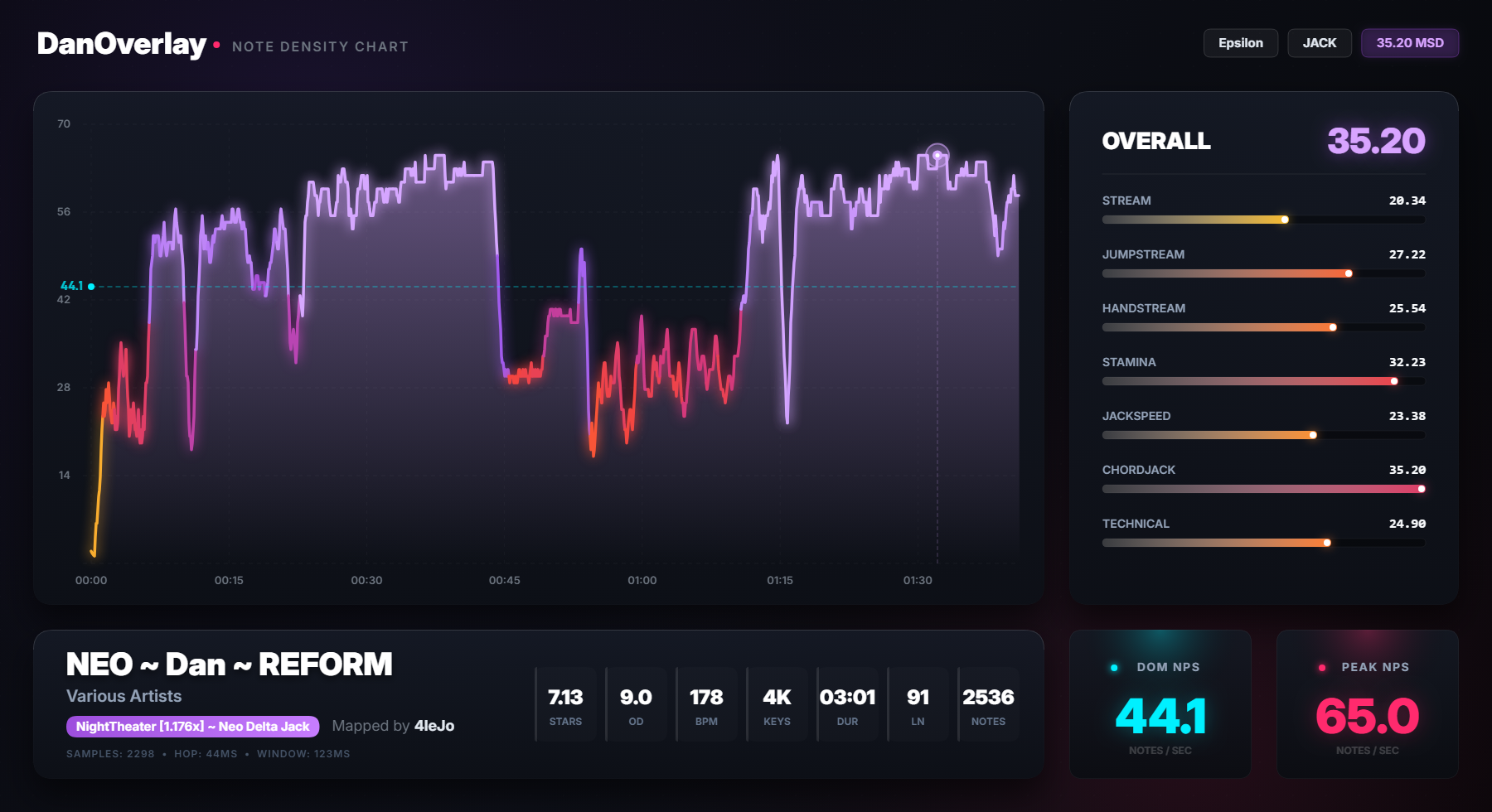
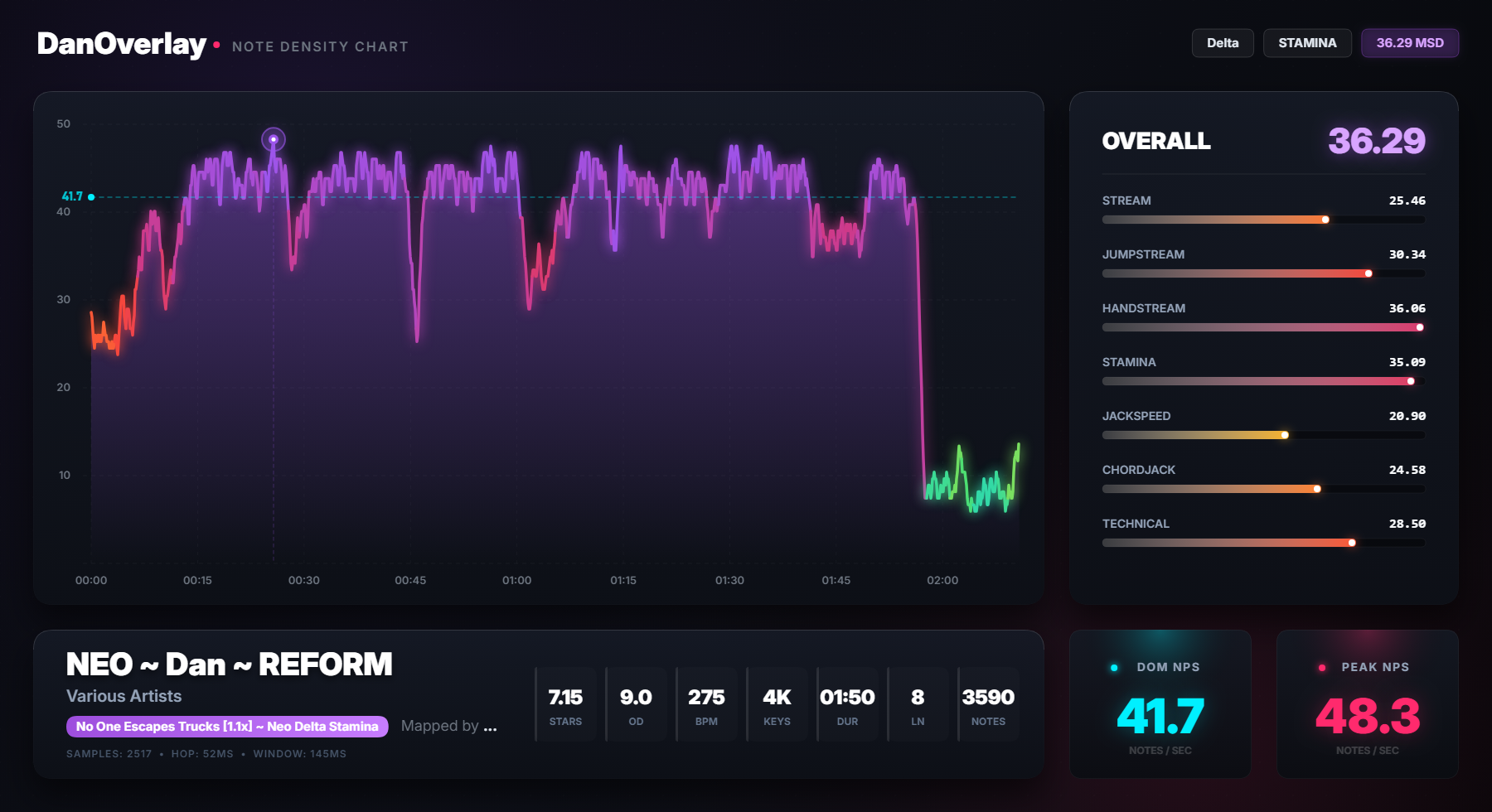
Press PNG to generate a standalone, full-resolution density graph — per-skillset MSD bars, complete timeline, no cropping.

How to use it

Three things running at the same time. That's it.

1

Run osu!

Either osu! stable or osu! lazer — both work. Open it and have a 4K mania map selected.

2

Run tosu

A lightweight background process that reads live game data.

3

Run DanOverlay

Open the .exe. The overlay connects automatically and starts estimating Dan tiers for whatever map you're on.

Don't have tosu?

tosu is required for the overlay to read live game data. It's free, lightweight, and takes seconds to set up.

Download tosu from GitHub
✓ osu! stable — full support ⚠ osu! lazer — custom rate changes in HT/DT mods are not detected

One button. Full-res chart.

Hit PNG in the overlay to export a standalone density graph — per-skillset MSD bars, full timeline.

It's not always right.

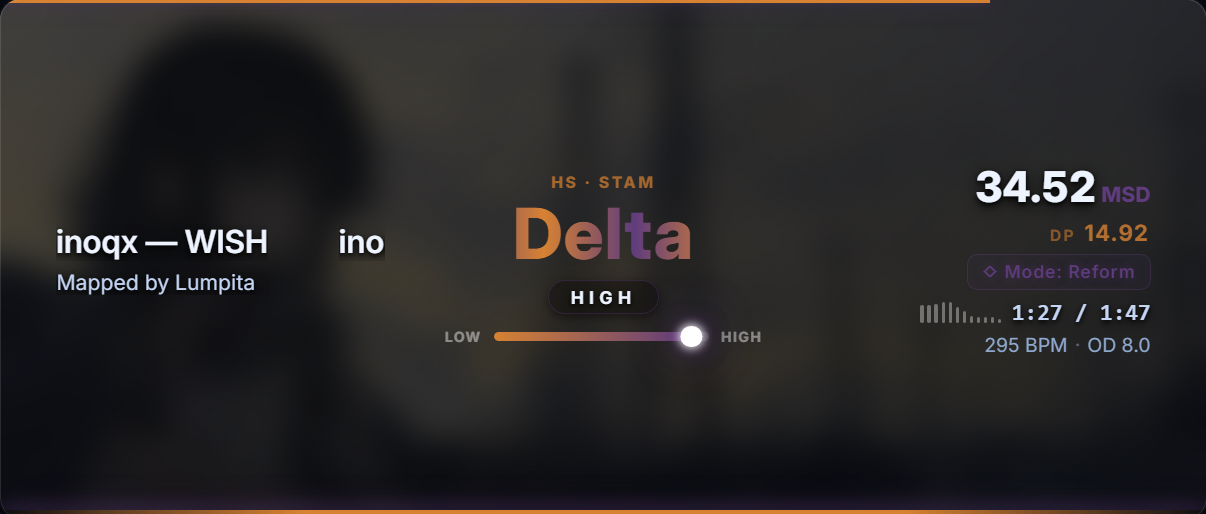
Straight answer: it works well most of the time, and then occasionally it'll confidently call your Zeta-tier speedjack map "Delta High" and act completely normal about it.

Wrong reads will happen

Anything with unusual density, hybrid patterns, or charts between two skillsets — the classifier can misfire. Sometimes badly. Vertex BETA used to land at Delta. That's fixed now. Others will too.

Genuinely absurd results are real

If it reads your Eta stamina marathon as "Alpha LOW" — that's not a glitch, it's just the algorithm having a terrible moment. No crash, no warning.

Getting patched, for real

Every bad call gets investigated. The goal is always a structural fix — not a special case for one map, but a change that handles that class of chart correctly.

It's like asking a friend who plays a ton of osu!mania to size up any map on the spot. Knows the Reform pack well, has strong opinions, solid gut reads — and occasionally says something completely unhinged. You still ask anyway.

The Speedjack Misread

Maps with dense speedjack patterns were misclassified as tech charts by up to two Dan tiers. Fixed.

Speedjacks produce a feature fingerprint nearly identical to chaos tech patterns. The classifier was routing maps through the wrong difficulty ruler.

The fix: when classifier confidence drops below 50% and MinaCalc's jack MSD dominates, the overlay defers to MinaCalc. Not a one-map hack — a structural change.

Vertex BETA (Silvia, by kasam53) was two Dans off consistently. It's now landing correctly.

It works now. Probably. We're like 90% sure.

Before — Delta HIGH After — Zeta LOW
BEFORE Delta HIGH

Download DanOverlay

v1.5 · Standalone .exe · No install needed

Download for Windows ~99 MB

⚠️ Still in development — do not expect precise results. Scoring modes are experimental.

Windows 10/11 · osu! stable or lazer · tosu running · Any 4K map
Source code coming eventually. No timeline. It's embarrassing right now.

Changelog

Scoring Modes

  • Added 4 alternating scoring modes: Reform, Celestial, Signicial, and Shoegazer — each with a fully independent difficulty model, rank scale, and visual identity.
  • Switch modes on the fly: Ctrl+1 for Reform, Ctrl+2 for Celestial, Ctrl+3 for Signicial, Ctrl+4 for Shoegazer.
  • Each mode displays its own stage name, tier label, and progress bar calibrated to its specific rank ladder.

LN Course — Automatic Detection

  • New dedicated LN Course mode with a regression model trained on long-note density and hold patterns.
  • Activates automatically when the current map exceeds 45% LN ratio — no manual switching needed.
  • LN Course coexists with the 4 manual modes: it overrides the display only while a qualifying map is selected.

Beyond Ceiling

  • All 5 modes now support a Beyond suffix when difficulty exceeds the highest tier threshold.
  • The stage label stays visible — e.g. Tachyon — Beyond — instead of an empty or broken state.

Resize & Controls

  • Press R to toggle between Free resize (drag freely) and Locked resize (aspect-ratio enforced). Replaces the old streamer/personal mode picker.
  • Press Ctrl+R to reset the window to its default size instantly.
  • Press Tab to pin or unpin the overlay over osu!, keeping it fully interactive.

Intro & UI

  • New What's New splash screen on first launch after an update.
  • Interactive Scoring Modes hint screen — press Ctrl+14 to try each mode before the overlay starts.
  • Celestial mode icons resized for better visual balance.
  • Intensity bar removed in Shoegazer and Celestial modes (not applicable to those scales).

Compatibility

  • Added automatic WebView2 Runtime detection on startup. If it's missing, the overlay now shows a clear error dialog with a direct download link instead of opening a blank white window. (In theory it should work — I had nobody to test it with, lol. If you run into any issues, feel free to reach out on my Discord: agent_ale.)
  • Extended GPU compatibility flags to reduce rendering issues on certain hardware configurations.
Download v1.5
  • Calibration improvements for more accurate difficulty ratings
  • Refined rank boundary thresholds for smoother tier placement
  • Visual polish and layout refinements in the overlay panel
  • Minor stability improvements
Download this version
  • Fixed startup bridge race: map analysis no longer stucks on COMPUTING
  • Fixed first-map blackout: removed full black transition
  • Recalibrated Dan rulers with practice packs + Reform finals
  • Tuned Iota anchors and sublevel boundaries
  • Fixed speedjack misclassification regression
Download this version
  • Mode picker on launch: Personal or Stream mode
  • Stream mode: 840×384 window with 1.2× zoom for OBS
  • Personal mode: window stays on top of osu!
Download this version
  • Overlay window stays on top of osu!
  • Build script cleanup for PyInstaller 6
Download this version
  • Initial release
  • Live Dan tier estimation — Alpha through Kappa
  • Skillset classification: CJ · JS · STAM · HS · TECH
  • PNG chart export — full-res density graph
  • Fixed speedjack misclassification (Vertex BETA)
Download this version